Explore Your Notion
as a Knowledge Graph
Turn links, mentions, backlinks, and database relations into an interactive relationship map—right from the page you’re viewing.
Your Notion content stays on your device. All features are currently free. Any future pricing change will be announced clearly. Privacy details

What you can do
Navigate complexity without leaving your workflow.
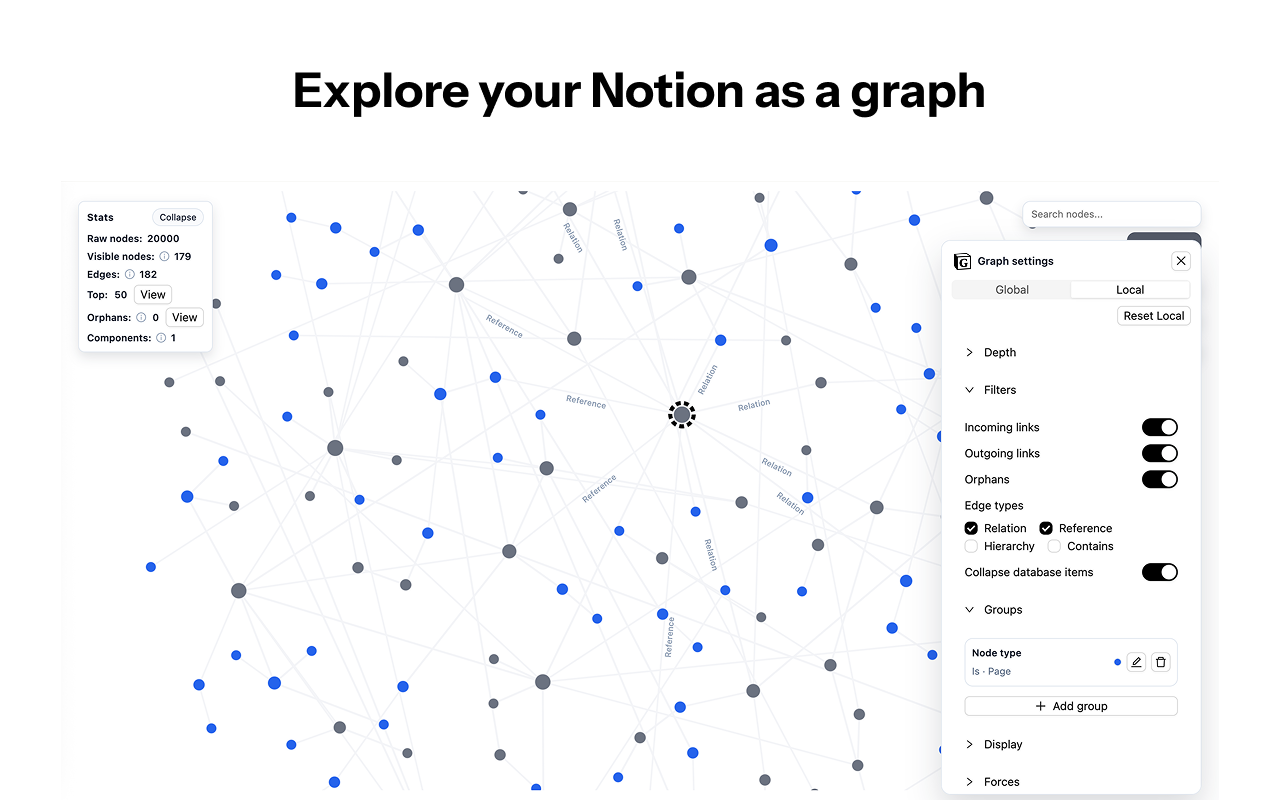
Start anywhere, zoom into context, and surface what matters: high-impact hubs, hidden dependencies, and orphaned pages. Keep your workspace navigable as it grows—with a fast, local-first workflow.
Core Features
From scattered links to structured insights.
Contextual Graph View
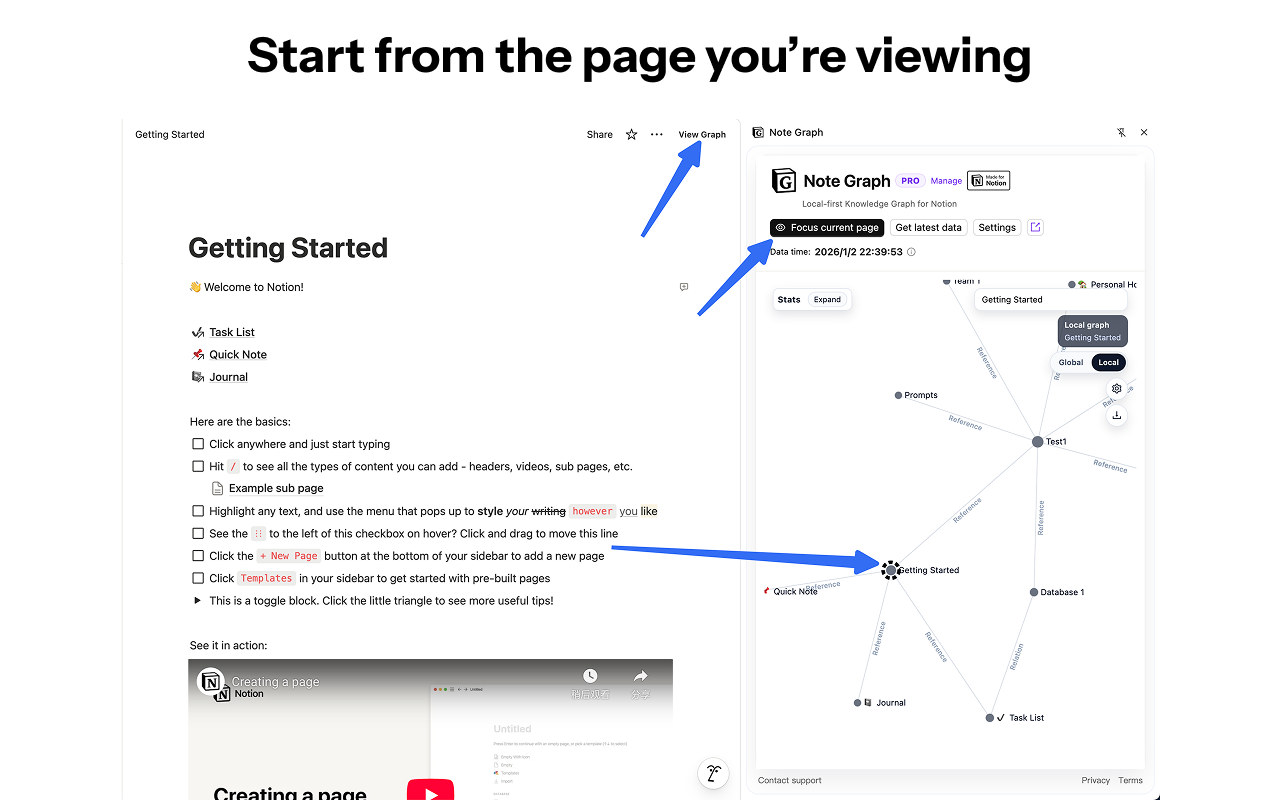
Automatically generate relationship views around the page you are browsing. Switch focus continuously to maintain a "what you see is what you connect" workflow.
Visual Relationship Network
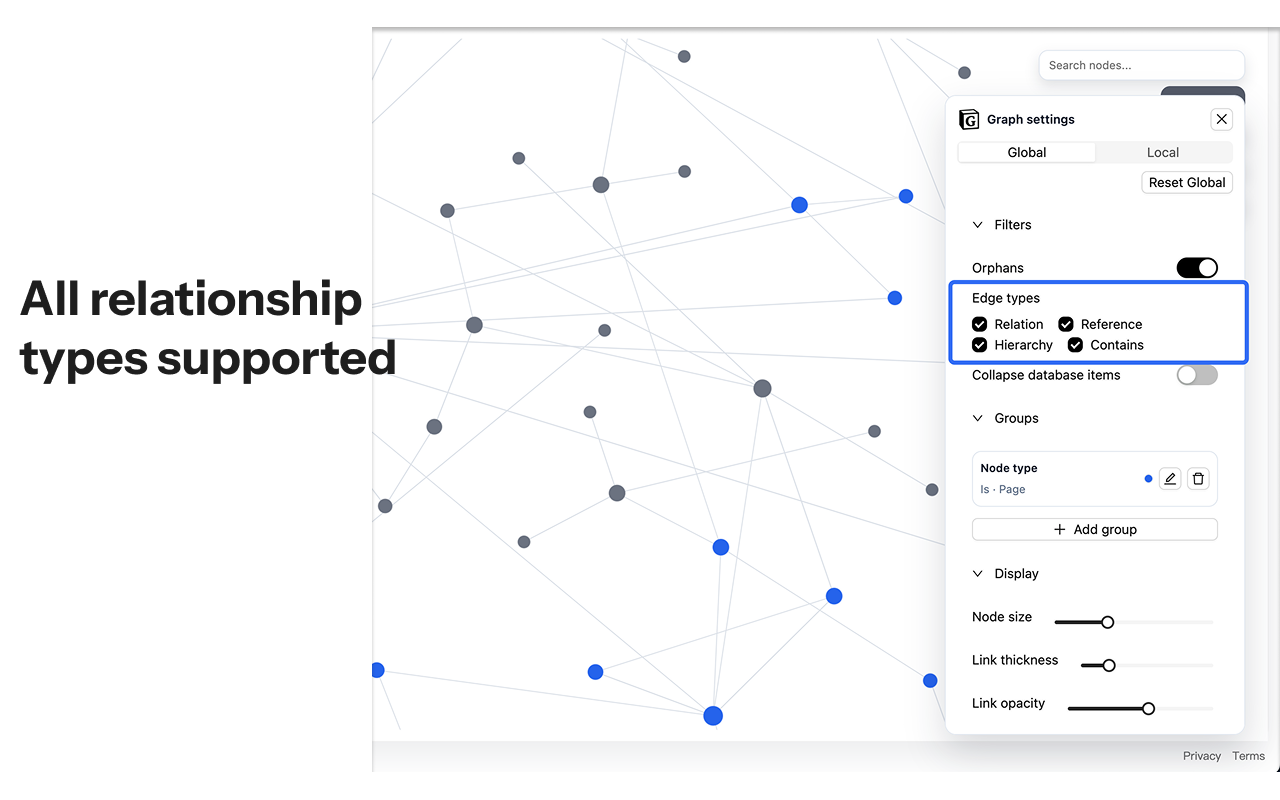
Unified visualization of page hierarchy, database relations, mentions, and links. Quickly understand content structure and trace dependencies.
Interactive Exploration
Hover to highlight upstream and downstream connections instantly. Open Notion pages directly from the graph for a closed-loop "Discover-Verify-Adjust" workflow.
Insights: Top & Orphans Lists
Quickly find the most connected “hub” pages in your workspace, and identify orphaned pages that may need cleanup. Jump to Notion directly from the list to take action fast.
View Management & Control FREE FOR NOW
Make complex workspaces readable with the full graph, advanced filters, groups, exports, and tab view included at no cost during the current free period.
Current pricing
Everything is currently free, with future pricing reserved if needed.
All features are enabled at no cost right now. If pricing changes later, we will announce it clearly in both the extension and the official website.
Current access
All features are included during the current free period.
- Full graph access
- Advanced filters, edge types, and groups
- Export options and tab view
- Top & Orphans insights and one-click jump to Notion
- Local-first graph generation on your device
Future pricing
Paid plans are not active right now.
- If paid plans are introduced later, we will announce them clearly in advance.
- Any future pricing update will be reflected in both the extension and the official website.
- The current free period does not require checkout or subscription activation.
Privacy & Data Security
Last updated:
This Privacy & Data Security Policy explains how Note Graph (the “Extension”) handles data. Note Graph is designed to be local-first: it reads your Notion workspace data (via the Notion API) to generate a relationship graph, and stores the resulting graph data locally in your browser.
1. What data we access from Notion
After you connect Notion, the Extension may read (depending on your authorization scope):
- Page and database identifiers and titles.
- Page and database content needed to detect relationships (for example: block structure and rich text that contains links, mentions, and backlinks).
- Relationship information (page mentions, linked pages/databases, relation properties).
- Basic metadata used for display and filtering (e.g., created time, last edited time, created by / last edited by).
2. How we use that data
- Generate graphs: build a relationship graph (nodes + links) for visualization and navigation.
- Improve usability: cache results locally so subsequent loads are faster.
- Access status: show current free-access messaging and, if pricing changes later, support future plan checks.
3. Where your data is stored
The Extension stores data locally in your browser using Chrome extension storage and local web storage mechanisms (e.g., Local Storage / IndexedDB). This includes cached graph data, graph metadata, and certain UI preferences.
- Notion access token: stored locally in Chrome extension storage.
- Graph cache: stored locally (nodes, edges, and labels) to speed up rendering and allow quick reloads.
- User directory (optional): a local mapping of user IDs to display names (stored locally for better labels).
- Access status: current free-access messaging may be cached locally. If paid plans are introduced later, plan status may also be cached.
Local data remains on your device until you clear it (for example, via the Extension’s clear cache action) or uninstall the Extension.
4. Chrome permissions (why the Extension asks)
- identity: required to complete Notion OAuth in a secure browser flow.
- storage: required to store your token, cache graph data, and save settings locally.
- tabs: used to detect the current Notion tab (e.g., “Focus current page”) and to open tab view when enabled.
- sidePanel: required to render Note Graph in the Chrome side panel.
- offscreen: used to run long-lived background fetch tasks without blocking the UI.
5. Data we do NOT upload (by default)
Note Graph does not upload your Notion page content to Note Graph-operated servers for graph processing. Notion content is requested directly from Notion’s API to your device, and the graph is generated locally. The graph is generated and rendered within the extension environment. If we introduce future cloud features (e.g., “Cloud Share”), they will be opt-in and clearly disclosed.
6. OAuth authorization and token exchange
To connect your Notion account, the Extension uses Notion OAuth. During the OAuth flow, an authorization code is exchanged for an access token via an OAuth exchange service:
- OAuth exchange endpoint:
https://notion-oauth.notegraph.net/ - Data sent: OAuth authorization code and redirect URI.
- Data returned: Notion access token.
This exchange service is used to complete the OAuth process; it should not require your Notion content. Like any web request, the exchange service will also receive standard network information (such as IP address and user agent) as part of processing the request. You should treat the access token as sensitive and keep it private.
7. Payments and subscriptions
Note Graph is currently fully free to use, and no checkout flow is active during the current free period. If we introduce paid plans later, we may enable a billing provider such as ExtensionPay and will update this page, the extension, and the official website before payments begin.
8. Support communications
If you contact us at support@notegraph.net, we will receive your email address and the content of your message. We use that information to respond to you and provide support.
9. Third-party services (disclosure summary)
We rely on third-party services to provide core functionality (Notion). The marketing site may also load assets from CDNs. If billing is enabled in the future, we will disclose the active payment provider before charging users. See the full list on the Third-Party page.
10. Security
We use local storage by default and limit data access to what is necessary for graph generation. No method of electronic storage is 100% secure; you use the Extension at your own risk.
11. Your choices
- You can revoke Notion access at any time in Notion’s settings.
- You can clear locally cached graph data using the Extension’s Clear cached data action.
- You can uninstall the Extension to remove local data stored by the Extension.
12. Contact
Questions? Contact support.
Terms of Service
Last updated:
These Terms of Service (“Terms”) govern your use of Note Graph (the “Extension”) and this website (together, the “Service”). By installing or using the Service, you agree to these Terms.
1. Eligibility
You must be legally able to enter into a binding agreement to use the Service. If you use the Service on behalf of an organization, you represent that you have authority to bind that organization.
2. License
We grant you a limited, non-exclusive, non-transferable, revocable license to use the Extension for your personal or internal business purposes, subject to these Terms and applicable laws.
3. Acceptable use
You agree not to:
- Reverse engineer, decompile, or attempt to extract source code from the Service except to the extent permitted by law.
- Use the Service to violate any law, regulation, or third-party rights.
- Interfere with or disrupt the Service (including bypassing feature gates or subscription checks).
- Use the Service to process data you do not have permission to access.
4. Notion connection
The Service integrates with Notion via OAuth and the Notion API. Your use of Notion is governed by Notion’s own terms and policies. We are not affiliated with Notion.
5. Subscriptions and payments
The Service is currently provided free of charge. We may introduce paid plans later if needed. If that happens, we will update this website and the extension in advance with the applicable pricing terms and effective date.
6. Disclaimers
THE SERVICE IS PROVIDED “AS IS” AND “AS AVAILABLE”, WITHOUT WARRANTIES OF ANY KIND, EXPRESS OR IMPLIED. We do not warrant that the Service will be uninterrupted, secure, or error-free.
7. Limitation of liability
TO THE MAXIMUM EXTENT PERMITTED BY LAW, WE WILL NOT BE LIABLE FOR ANY INDIRECT, INCIDENTAL, SPECIAL, CONSEQUENTIAL, OR PUNITIVE DAMAGES, OR ANY LOSS OF DATA, PROFITS, OR REVENUE, ARISING FROM OR RELATED TO YOUR USE OF THE SERVICE.
8. Changes and termination
We may modify the Service or these Terms from time to time. If changes are material, we will update the “Last updated” date. We may suspend or terminate your access to the Service if you violate these Terms.
9. Contact
If you have questions about these Terms, contact support.
Third-Party Disclosures
Last updated:
Note Graph relies on third-party services and libraries to provide functionality. This page lists key third parties and what data may be shared with them.
1. Services used by the Extension
- Notion API (
https://api.notion.com/): used to read authorized workspace data needed to build the graph. - Notion OAuth (
https://api.notion.com/v1/oauth/authorize): used to request user authorization. - OAuth exchange service (
https://notion-oauth.notegraph.net/): exchanges OAuth authorization code for a Notion access token. - ExtensionPay (
https://extensionpay.com/): retained as a possible future billing provider, but not active during the current free period.
2. Services used by this marketing website
When you visit this website, your browser may connect to third-party CDNs to load fonts and scripts. These providers may receive standard web request data (such as IP address, user agent, and referrer) as part of serving those resources.
- Google Fonts (
fonts.googleapis.com,fonts.gstatic.com): font loading. - Tailwind CDN (
https://cdn.tailwindcss.com): CSS framework runtime. - unpkg (Lucide icons) (
https://unpkg.com): icon library loading.
3. Notes
- This list may change as the Service evolves. We will update this page when we make material changes.
- Third parties have their own terms and privacy policies. Review them before use.
4. Contact
If you have questions about third-party services, contact support.